
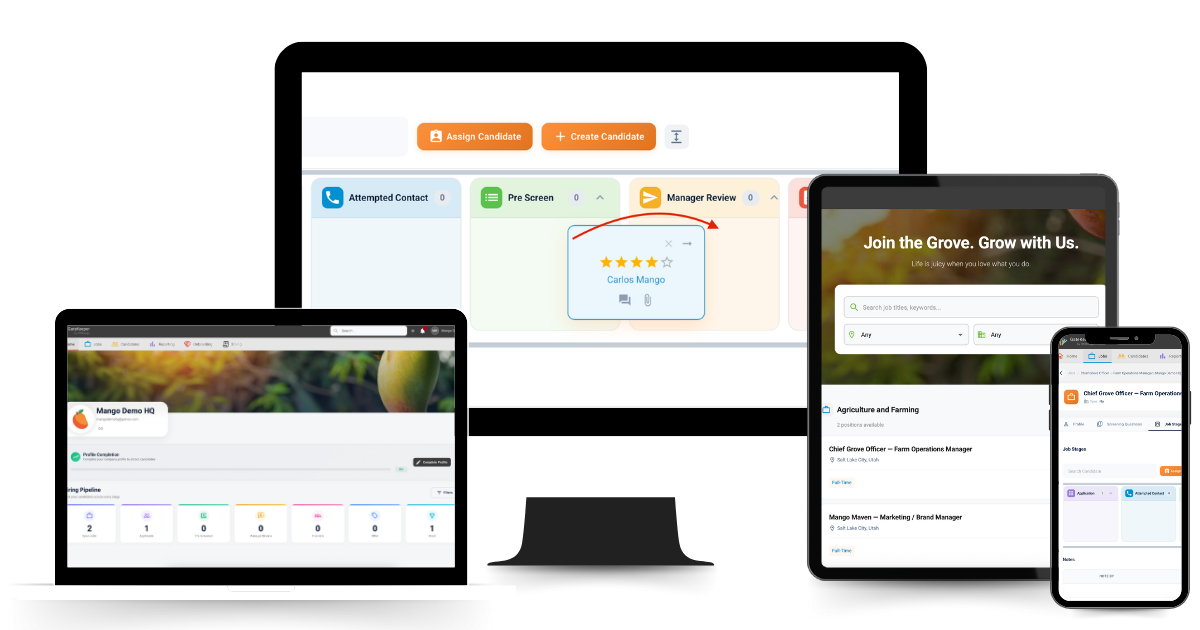
TL;DR: An applicant tracking system (ATS) is software that organizes your entire hiring process in one place — from job posting to offer letter. It replaces the spreadsheets, email chains, and sticky notes that make hiring chaotic. For small businesses, a good ATS means fewer dropped candidates, faster decisions, and a hiring process that actually scales. And with GateKeeper, it’s free for your first 5 users.

What Is an Applicant Tracking System (ATS)?
An applicant tracking system — commonly called an ATS — is software that manages your hiring pipeline from start to finish. It’s the central hub where job postings live, applications come in, candidates get tracked, and hiring decisions get made.
Without one, hiring tends to look like this: resumes buried in email inboxes, status updates living in someone’s head, interviewers giving feedback in three different Slack threads, and great candidates falling through the cracks because nobody followed up in time.
An ATS fixes all of that.
Every candidate, every role, every stage of the process — visible, organized, and actionable in one place.
For large companies, an ATS is standard infrastructure. For small businesses, it’s been historically out of reach — either too expensive, too complicated, or built for HR departments that small teams don’t have. That’s exactly the gap GateKeeper ATS was built to close.
What Does an ATS Actually Do?
The core job of an ATS is to bring order to a process that tends toward chaos. Here’s what a modern ATS handles:
Job Posting
Create and publish job listings from one place. A good ATS gives you a branded career page that collects all applicants automatically — no more telling candidates to “email your resume to hiring@company.com” and hoping for the best.
Application Collection
Every application that comes in lands in your ATS — organized by role, timestamped, and ready to review. No more digging through inboxes or forwarding attachments between team members.
Candidate Pipeline Management
This is where the real value is. An ATS gives you a visual pipeline — think drag-and-drop stages like Applied, Screening, Interview, Offer, Hired — so you always know exactly where every candidate stands. Our article on how to audit your hiring process in 30 days shows how transformative a clear pipeline can be.
Team Collaboration
Hiring managers, interviewers, and decision-makers can leave notes, scores, and feedback directly in the system — on the candidate’s profile, tied to the role. No more “what did we think of that second candidate?” conversations that nobody can answer.
Candidate Communication
Automated follow-ups, status updates, and rejection notices go out without anyone having to manually send them. This matters more than most people realize — candidate ghosting often happens because businesses take too long to respond. We break this down in our piece on why time kills good candidates.
Offer Letters and Onboarding
The best ATS platforms extend beyond the hire decision — generating digital offer letters and collecting new hire paperwork so the transition from candidate to employee is smooth.
Reporting and Metrics
How long does it take to fill a role? Where are candidates dropping off in the process? Which sources are producing the best applicants? An ATS answers these questions with data instead of guesswork. For the metrics that actually matter, read our article on the 5 metrics that reveal your recruiting process is broken.
Do Small Businesses Really Need an ATS?
This is the most common pushback we hear — and it’s worth addressing directly.
The assumption is that an ATS is for big companies with full HR departments and hundreds of applicants per role. But that’s exactly backwards. Small businesses need an ATS more than large ones — because they have less margin for error.
A large company can absorb a bad hire. A 15-person team cannot. A large company has dedicated HR staff to chase candidates and manage the process. A small business owner is doing it between everything else on their plate.
Consider what’s actually at stake when hiring is disorganized:
- Great candidates accept other offers while waiting to hear back from you
- Bad hires slip through because the screening process wasn’t consistent
- Roles sit open longer than necessary, stretching your existing team thin
- The owner spends hours every week on recruiting admin instead of running the business
Our research on why 46% of new hires fail points directly to process breakdowns as the root cause — not a lack of good candidates. An ATS doesn’t just organize your hiring. It protects you from the far larger cost of getting it wrong. See exactly how much that can cost in our article on how employee turnover is draining your business.
ATS for Small Business vs. Enterprise ATS: What’s the Difference?
Not all applicant tracking systems are built the same. Enterprise ATS platforms — Workday, Greenhouse, Lever, iCIMS — are built for companies with dedicated recruiting teams, complex approval workflows, and budgets to match. They’re powerful. They’re also overkill for a 20-person company trying to hire an office manager.
Here’s what to look for in an ATS built for small businesses:
| Feature | Enterprise ATS | Small Business ATS (GateKeeper) |
|---|---|---|
| Setup Time | Weeks to months | Under 5 minutes |
| Price | $500–$5,000+/month | Free for first 5 users |
| Tech Skills Required | Yes — often needs IT support | None — built for non-HR teams |
| Built For | HR departments, high-volume hiring | Owners and small teams |
| Support | Ticketing system, slow response | Real human support included |
For a full breakdown of how to choose the right ATS for your team size, read: Which Applicant Tracking System Makes Sense for Small Businesses?
How Does an ATS Work, Step by Step?
Step 1: Create Your Career Page
Your ATS generates a branded career page where all your open roles live. Candidates apply directly through it — no third-party job board required, though you can post there too and funnel applicants back to your ATS.
Step 2: Applications Come In Automatically
Every application lands in your ATS, organized by role. You can see all applicants at a glance without opening a single email attachment.
Step 3: Screen and Score Candidates
Review resumes, add notes, and move candidates through stages. Some ATS platforms include screening questions that filter applicants before they ever reach your inbox. The best ones make it easy to spot the top candidates fast — so you can move before a competitor does.
Step 4: Collaborate With Your Team
Share candidate profiles with interviewers, collect structured feedback, and make hiring decisions with full context — all inside the system. No more “forward this resume to everyone” email chains.
Step 5: Send Offers and Onboard
Generate a digital offer letter, collect e-signatures, and begin onboarding paperwork — all from the same platform. The hire is complete before the candidate’s first day, not scrambling to finish it during.
For a practical guide to putting this process to work from day one, read: How to Use an ATS to Hire Your First 10 Employees.
What Makes GateKeeper ATS Different?
Most applicant tracking systems were built for HR professionals. GateKeeper was built for small business owners who are already wearing ten hats and just need hiring to work.
Here’s what sets it apart:
- ✓ Free for your first 5 users — no credit card, no trial period, no expiration
- ✓ Live in under 5 minutes — no IT department, no implementation consultant, no onboarding call required
- ✓ Drag-and-drop pipeline — see every candidate’s status at a glance
- ✓ Automated follow-ups — stop candidates from ghosting mid-process
- ✓ Digital offer letters and onboarding paperwork — built in from day one
- ✓ Real human support — backed by HRmango’s 20+ years of recruiting expertise
- ✓ Discounted access to HRmango recruiting services — when you need more than software, we’re already in your corner
We built GateKeeper because small businesses deserve enterprise-quality hiring infrastructure — without the enterprise price tag or complexity. And because our fractional recruiting and RPO services fund our software development, we’re able to offer GateKeeper free to small teams — for life.
Claim Your Free GateKeeper Seats →
When Should a Small Business Start Using an ATS?
The honest answer: earlier than you think.
Most small business owners wait until hiring is already painful before looking for a solution. By that point they’ve already lost candidates, made at least one hiring mistake, and spent more hours on recruiting admin than they care to admit.
The right time to set up an ATS is before the chaos — not after. If you’re making even 2–3 hires per year, a system pays for itself immediately. And when your ATS is free, there’s no reason to wait at all.
A good rule of thumb: if you’ve hired one person and plan to hire again, you’re ready for an ATS. Our full guide on small business hiring in 2026 walks through exactly how to build a system that scales with you.
ATS and Recruiting Support: Better Together
An ATS organizes your process. But it doesn’t source candidates, write job descriptions, conduct screening calls, or negotiate offers. For that, you need people.
That’s why GateKeeper is designed to work seamlessly alongside HRmango’s recruiting services:
- Fractional Recruiting — a senior recruiter embedded in your process on a part-time, flexible basis
- Done-For-You Hiring (RPO) — full recruiting function outsourced to HRmango for high-volume or complex hiring needs
- Talent Sourcing Support (RSO) — dedicated sourcing support to fill your pipeline with qualified candidates
- Fractional HR & Compliance — HR expertise on demand as your team and obligations grow
GateKeeper subscribers get preferred pricing on all HRmango services — so starting free doesn’t mean staying limited.
Is an ATS Right for Your Business?
If you’re hiring — even occasionally — the answer is yes. The only question is which one.
For small and growing teams, GateKeeper is the obvious starting point: free, fast to set up, built for owners, and backed by real recruiting expertise when you need more than software alone.
Get in touch if you have questions, or claim your free account and be live in minutes.
Frequently Asked Questions About Applicant Tracking Systems
What does ATS stand for?
ATS stands for Applicant Tracking System — software that manages job postings, applications, candidate pipelines, and hiring communication in one place.
Is an ATS only for large companies?
No — and this is one of the most common misconceptions. Small businesses often benefit more from an ATS than large ones because they have fewer resources to absorb hiring mistakes or inefficiencies. GateKeeper was built specifically for small and growing teams.
How much does an ATS cost?
Enterprise ATS platforms can cost hundreds to thousands of dollars per month. GateKeeper is completely free for your first 5 users — no credit card, no time limit. Above 5 users, pricing scales affordably with your team size. See the full pricing breakdown at hrmango.com/applicant-tracking-system.
How long does it take to set up an ATS?
With GateKeeper, under 5 minutes. Sign up, get approved same day, and your career page is live before lunch.
Does an ATS replace a recruiter?
No. An ATS organizes and manages the process — it doesn’t source candidates, conduct interviews, or make hiring decisions. Think of it as the infrastructure your recruiter works inside of. When you need the human expertise to go with the system, HRmango’s fractional recruiting and RPO services plug in directly.
Can I use an ATS if I’m not in HR?
Absolutely — and that’s exactly who GateKeeper is built for. Most of our users are business owners, operations managers, and team leads who are handling hiring themselves without an HR background. The platform is designed to be intuitive for non-HR users from day one.
HRmango is a recruiting and HR services company based in Lehi, Utah, with 20+ years of experience helping small and growing businesses hire smarter. GateKeeper ATS is free for your first 5 users, and our recruiting services are available on flexible, no-surprise terms. Get in touch to learn more.

One Comment